
Developing software for microcontrollers has become significantly easier and more accessible over the years. Thanks to advancements in user-friendliness, even beginners can dive into the world of embedded systems. Arduino has revolutionized this field by providing affordable and easy-to-use hardware and software. The Arduino IDE contains a lot of prebuilt libraries, so that anyone with little programming skills (C++) can easily develop simple microcontroller routines. The real strength of Arduino is its flawless interaction of hard- and software and its ease of use.
While there are numerous ways to develop software for microcontrollers, this article will focus on three popular options: Arduino, PlatformIO, and MicroPython. We’ll dive into the pros and cons of each, considering factors like modularity, complexity, scalability, debugging, performance, and suitability for different user groups.
Arduino #
Arduino is a microcontroller platform that combines hardware and software, making it affordable and accessible to everyone. The hardware is open source, meaning the schematics and layouts are freely available, can be customized and hold the documentation of their functionality. This has enabled students, designers, artists, and hobbyists to quickly create their own microcontroller-based projects with minimal programming knowledge.
The ease of use, simple programming environment and inexpensive microcontroller boards have helped Arduino to its success. Arduino boards don’t need any special programming devices, they usually have a USB port that can be used to program the hardware directly. Thanks to pre-flashed bootloaders. 😜
To get started with Arduino you just have to download the Arduino IDE, install it, start it, add a few lines of code and off you go.
Strengths:
- Beginner-friendly
- Easy to use
- Lot of examples and online resources
- Support of Arduino software and hardware
- Integrated library manager
- Good performance (compiled code)
Weaknesses:
- Limited debugging capabilities
- IDE lacks features for complex projects
- IDE is not extensible (no plugins)
- Difficult to work with multiple files and folders
Personally, I don’t use the Arduino IDE because it doesn’t offer enough features for me. The available software libraries are helpful and are very often provided by hardware manufacturers themselves. I frequently use Arduino hardware, I own a few Arduino boards and am very happy with them. However, this development environment and framework is highly recommended for beginners, as getting started in the world of microcontrollers couldn’t be easier than with the Arduino ecosystem.
PlatformIO #
PlatformIO is a plugin for Visual Studio Code (VSCode) and offers a cross-platform development environment for a wide range of microcontrollers. It does not matter if you want to develop for specific hardware, meaning you can use a variety of different microcontroller boards from Arduino, Raspberry Pi, Microchip, ESP32, … You can develop with PlatformIO “independently” of the microcontroller architecture (over 1500 different microcontroller boards are supported). “Independent” because there are often specific features that are not available on all controllers.
The Arduino framework and Arduino libraries can be integrated with PlatformIOs Libraries Manager, or if you are more advanced you can even integrate libraries manually (with versioning in mind). PlatformIO relies on a central configuration file (can be flexibly defined for each project), in which boards, frameworks, communication ports, …. can be defined. If you want to port your code to another microcontroller, you only have to make small changes in this central file and your software is compiled for a totally different target. There will be more detailed articles published on this topic soon.
Like Arduino, PlatformIO uses C or C++ as programming language. The appropriate compilers are loaded and configured in the background depending on the defined microcontroller boards.
If you want to develop with PlatformIO, all you have to do is install Visual Studio Code and install PlatformIO using the integrated extension manager. You can then start developing immediately and will be rewarded with the familiar VSCode features. File manager, Git integration, terminals, …. If there are still open requests, you can install additional extensions.
If you create a new project with PlatformIO, all you have to do is enter a project name, choose the microcontroller board to be used and a software framework. The IDE automatically creates a folder with all necessary files so that you can get started right away. The project can even be compiled directly, as it already contains the necessary configuration file and some executable source code for the microcontroller. The structure looks the same as in the Arduino IDE, no wonder we have elected the Arduino framework 😜
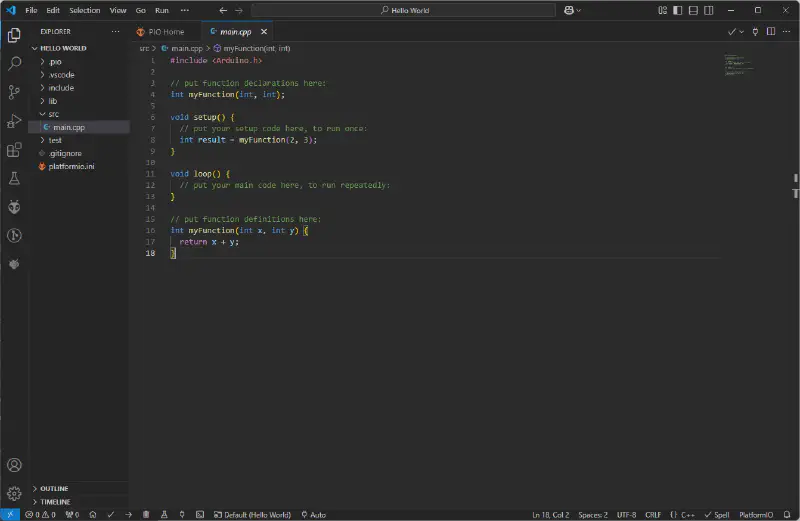
PlatformIO contains almost all the hardware and software that Arduino provides too. Sometimes PlatformIO might not offer all the hardware/software support from the release date, because the Arduino libraries or Arduino Core need to be adapted. With PlatformIO you get all the advantages of Arduino, plus the additional support of countless additional microcontroller boards. :e_winking_eye:
Strengths:
- Supports Arduino hardware and software
- Integrated library manager
- Integrated board manager
- Good performance (compiled code)
- Debugging capabilities
- Supports a wide range of hardware
- Easy to work with multiple files and folders
- Extensible through plugins
- Version control for code and libraries
Weaknesses:
- Slightly more complex than the Arduino IDE (for beginners)
I personally like to use PlatformIO for development of microcontroller software. It offers a lot of flexibility, support for a wide range of microcontrollers and includes everything a professional IDE for embedded software has to contain. I can only recommend everyone to use PlatformIO, it is my personal favourite when it comes to embedded software development. It might be a little harder to get started with, but you will be rewarded on long term!
MicroPython #
Another option for developing microcontroller software is MicroPython. MicroPython takes a different approach to Arduino and PlatformIO. No code is compiled here, Python can be interpreted directly. It is possible to write Python programs, store them on the microcontroller or write the Python instructions directly via a console/terminal. This interaction via REPL (Read Evaluate Print Loop) offers a flexibility of development, which is not possible with C.
Python is currently one of the most widely used programming languages and this high-level language can be used to develop microcontroller software. All you need to do is install a Python interpreter on the microcontroller, which receives commands via a terminal (REPL) or via a main.py file, which is loaded onto the microcontroller. Once the interpreter has been flashed, a development environment is no longer required. The “bare” Python files are located directly on the microcontroller and can be edited using a simple text editor.
Of course, there are also ready-made IDEs for flashing the interpreter and simpler development. One option worth mentioning is Thonny.
Strengths:
- High-level programming language
- Supports a variety of hardware
- No dedicated IDE required (just a text editor)
- Code doesn’t need to be compiled
Weaknesses:
- Performance is slower due to interpreted code
- Limited debugging capabilities
- Support for microcontrollers is growing but still limited
MicroPython is particularly suitable for people who are already familiar with Python. MicroPython also offers a large number of libraries, but unfortunately this is not comparable to the number of Arduino libraries. A simple program can be developed very easily, so it is also suitable for initial prototypes. Unfortunately, the performance is far from that of Arduino or PlatformIO, but modern microcontrollers are becoming more and more performant and MicroPython can be a very interesting alternative for applications that are not time-critical!
Summary #
Personally, I prefer PlatformIO as a development environment because it offers the best performance and the most flexibility (boards, microcontrollers). MicroPython is a very interesting alternative because it can be used to solve very complex problems very easily. Unfortunately, the running code is not as performant as the other alternatives, but you must keep in mind that you don’t always need such performance, a quick implementation could be more important. Performance is not always the most important thing!